
Condition monitoring for mines and plants
Motor circuit, vibration, oil and thermal readings in one platform, graded pass, monitor or fail, with alerts that take you straight to the part on a 3D model of the machine.
- No new sensors needed
- Works with the readings you already take
- Imports your PDF reports
Sample data
-
Condition monitoring
Motor circuit, vibration, oil and thermal readings in one place.
-
3D machine workspace
Every fitted part, rebuilt from the manual. Click anything.
-
Alerts that reach you
In the app, by email and on WhatsApp when a reading crosses a limit.
-
Client-ready reports
PDF reports out. Your existing PDF reports in.
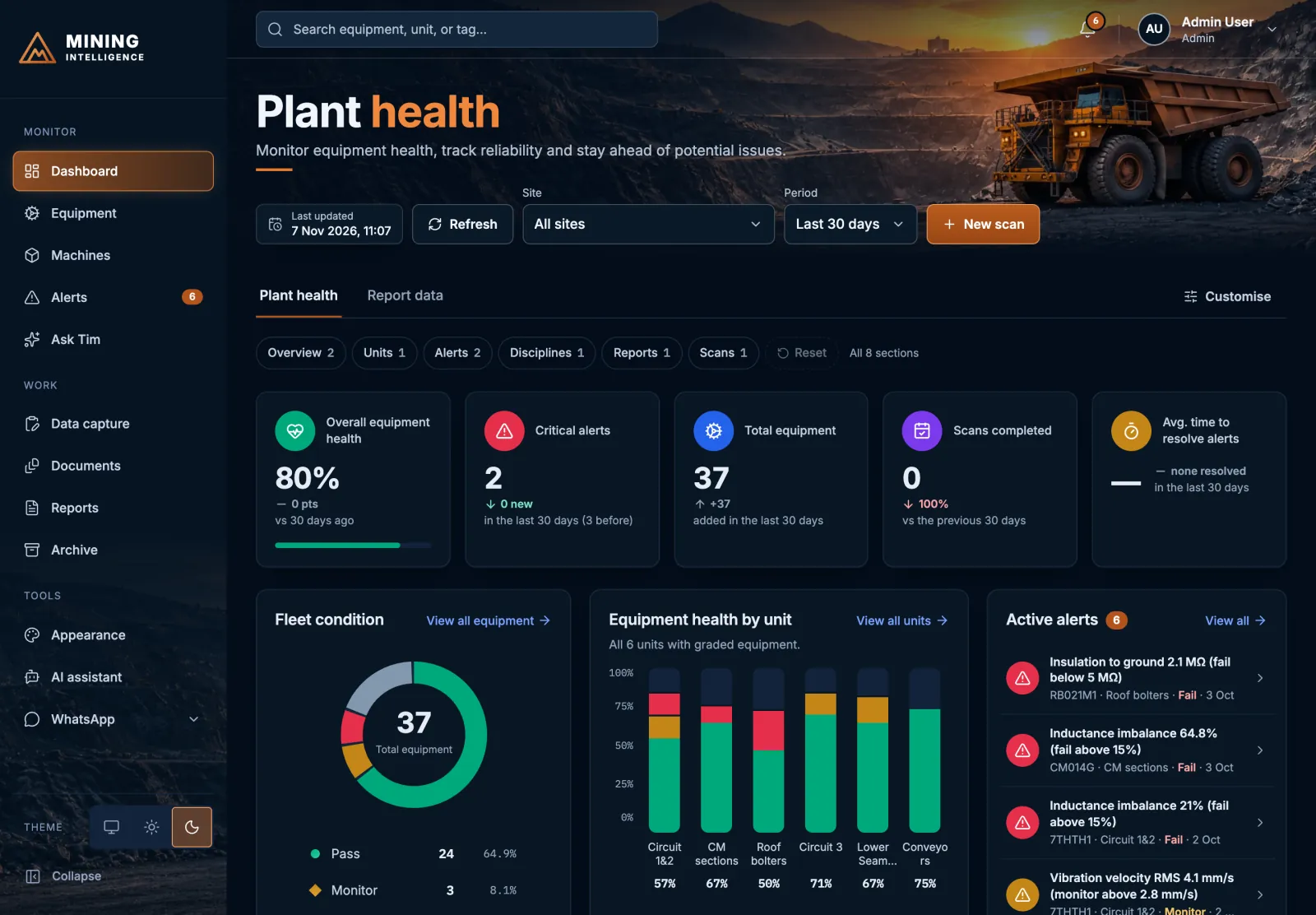
Plant health
One view of every machine on the plant.
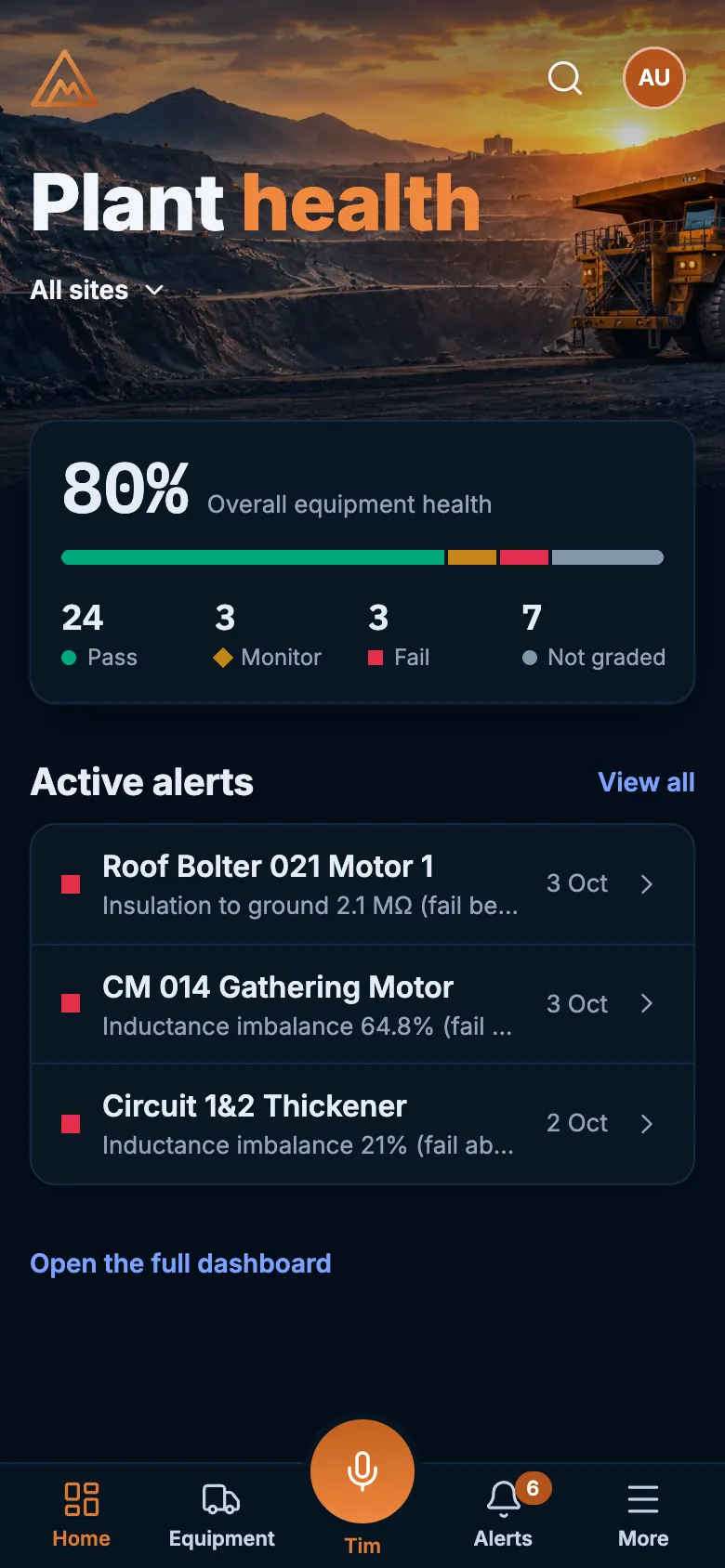
Overall equipment health, critical alerts, fleet condition and health by unit, kept current as readings come in. Drill from the plant to the unit to a single motor.
Sample data
Graded, not guessed
Every reading is graded pass, monitor or fail against limits you set for each equipment type.
One registry
Every site, unit and tag in a searchable registry, with the readings and discipline views behind each one.
Four disciplines, one story
Motor circuit analysis, vibration, oil and thermal side by side, so one machine tells one story.
Limits that raise their own alerts
The moment a reading crosses a limit, you know.
The platform raises the alert, tells the right people by email and WhatsApp, and tracks how long it has gone unresolved, so overdue alerts stand out.
- Acknowledge, diagnose and resolve in one place
- Alert ageing tracked against targets you set
- “Show on machine” opens the part in 3D
Bring the data you already have
No new sensors. No retyping.
Type it in
Capture forms for the readings your technicians take on the plant.
Import it
Load readings from a CSV or Excel file in one go.
Upload the report
Upload an oil, motor circuit or vibration PDF report in a supported layout and the readings are imported. Read by fixed rules, never by AI.
3D machine workspace
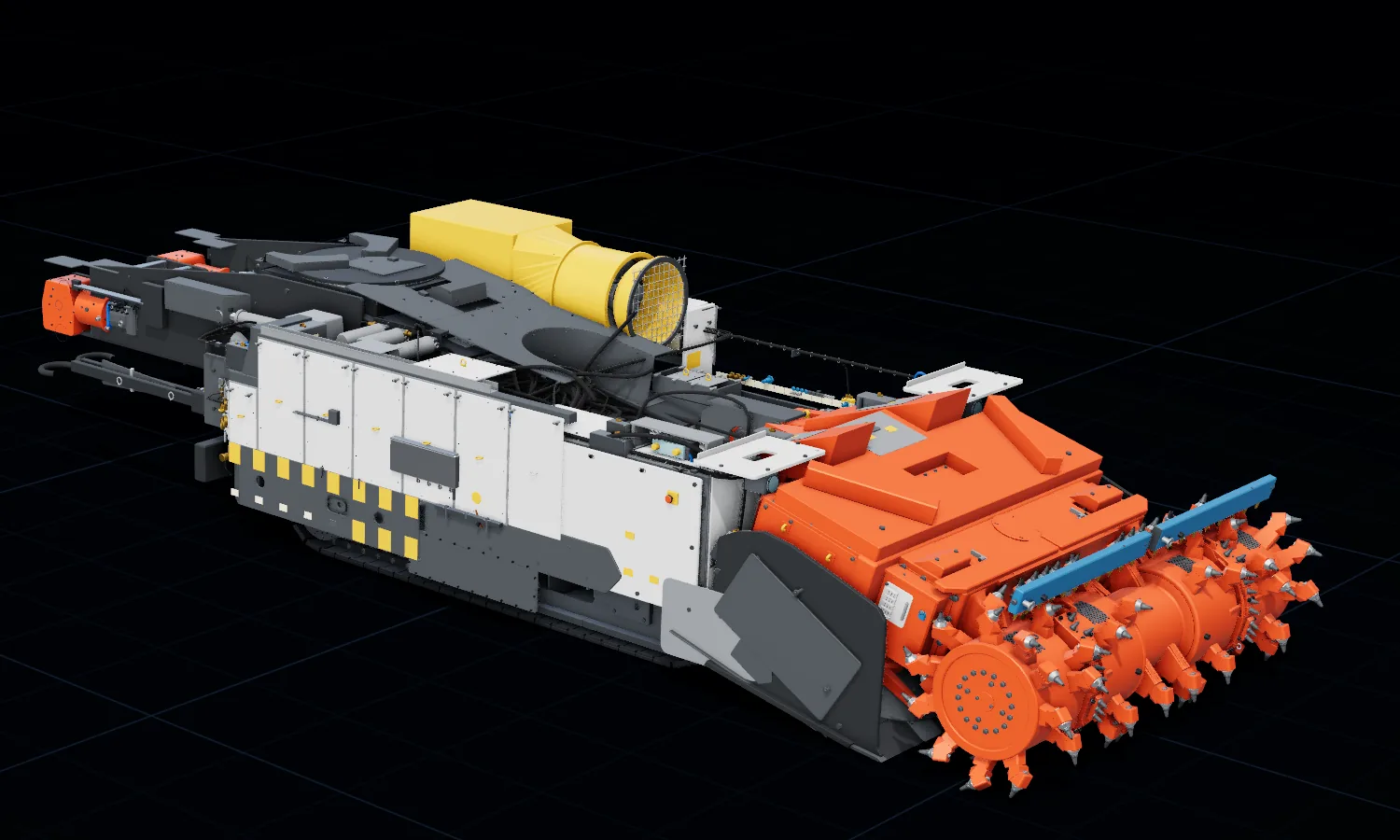
Every fitted part, rebuilt in 3D from the manual.
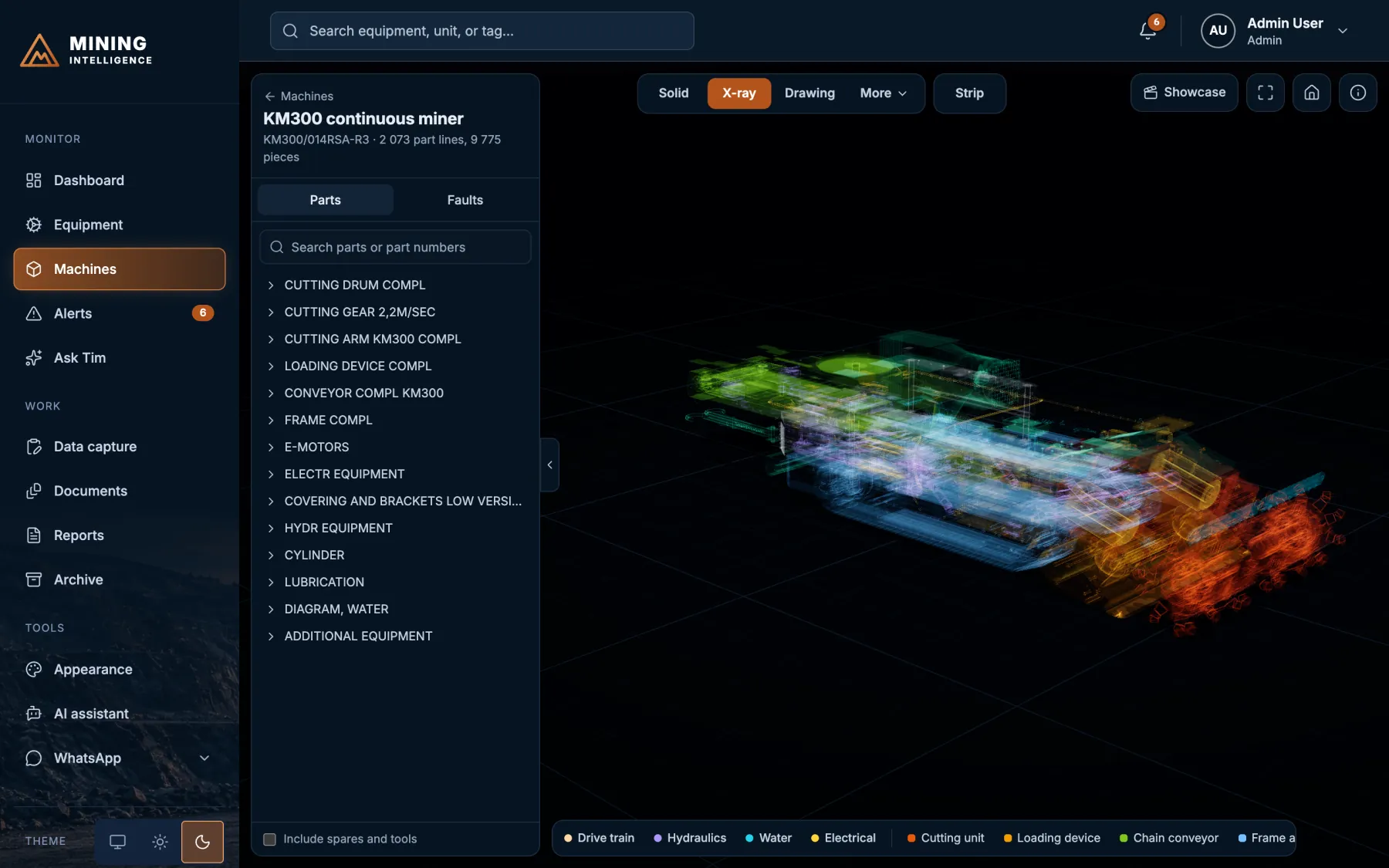
Turn it, zoom in and click anything. The sample model is a continuous miner with 2,073 part lines and 9,775 individual pieces, built from the manufacturer’s parts manual.
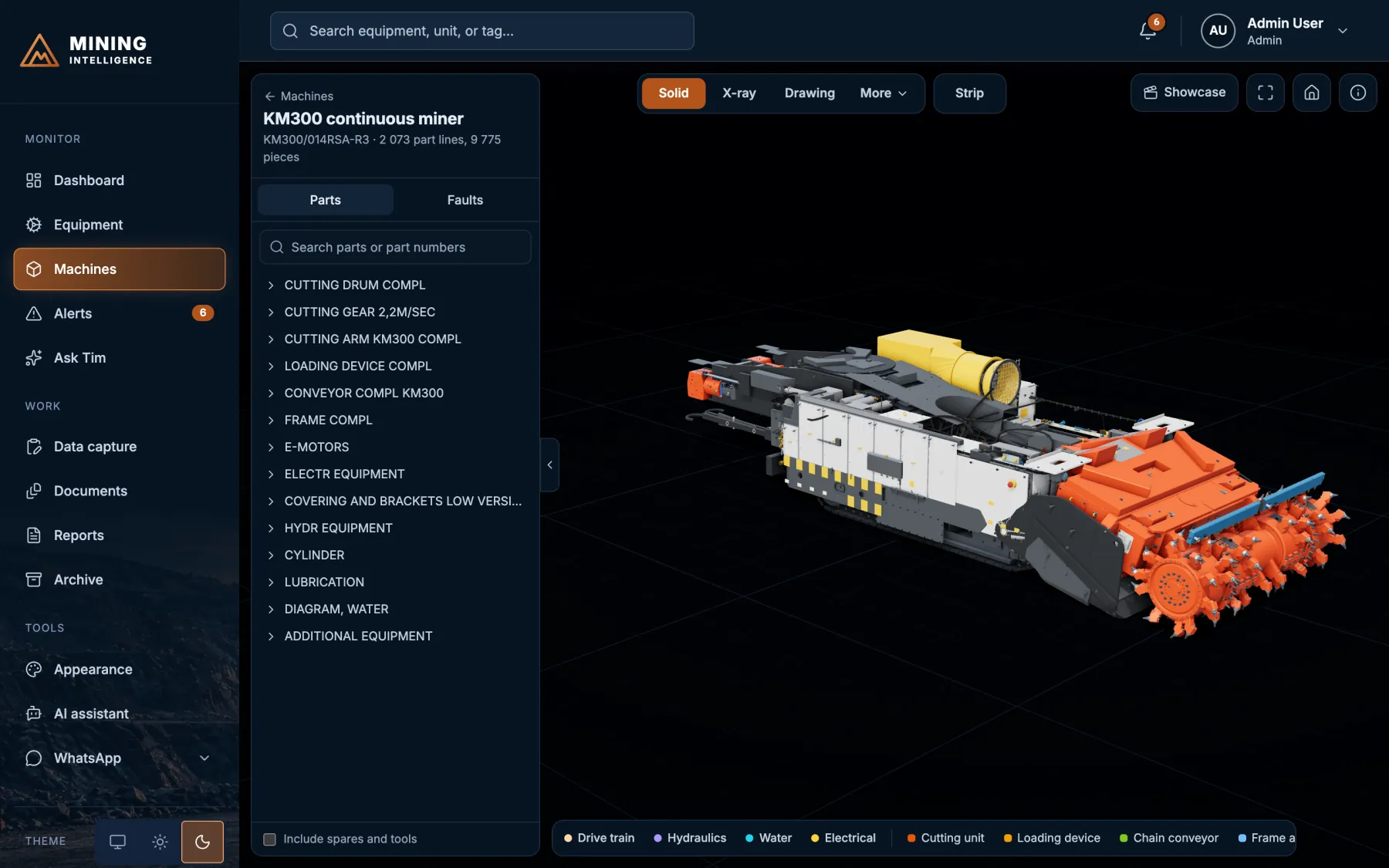
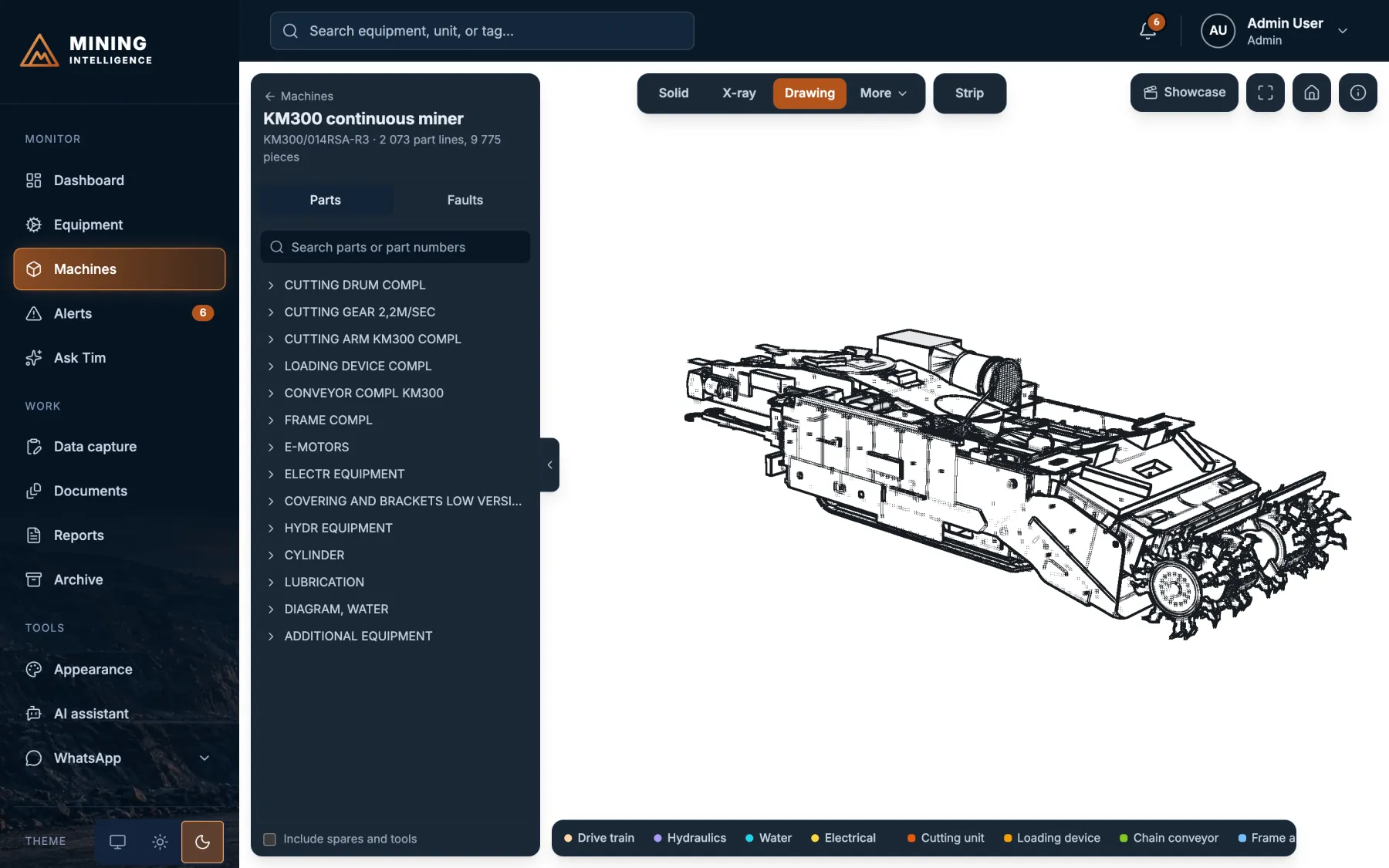
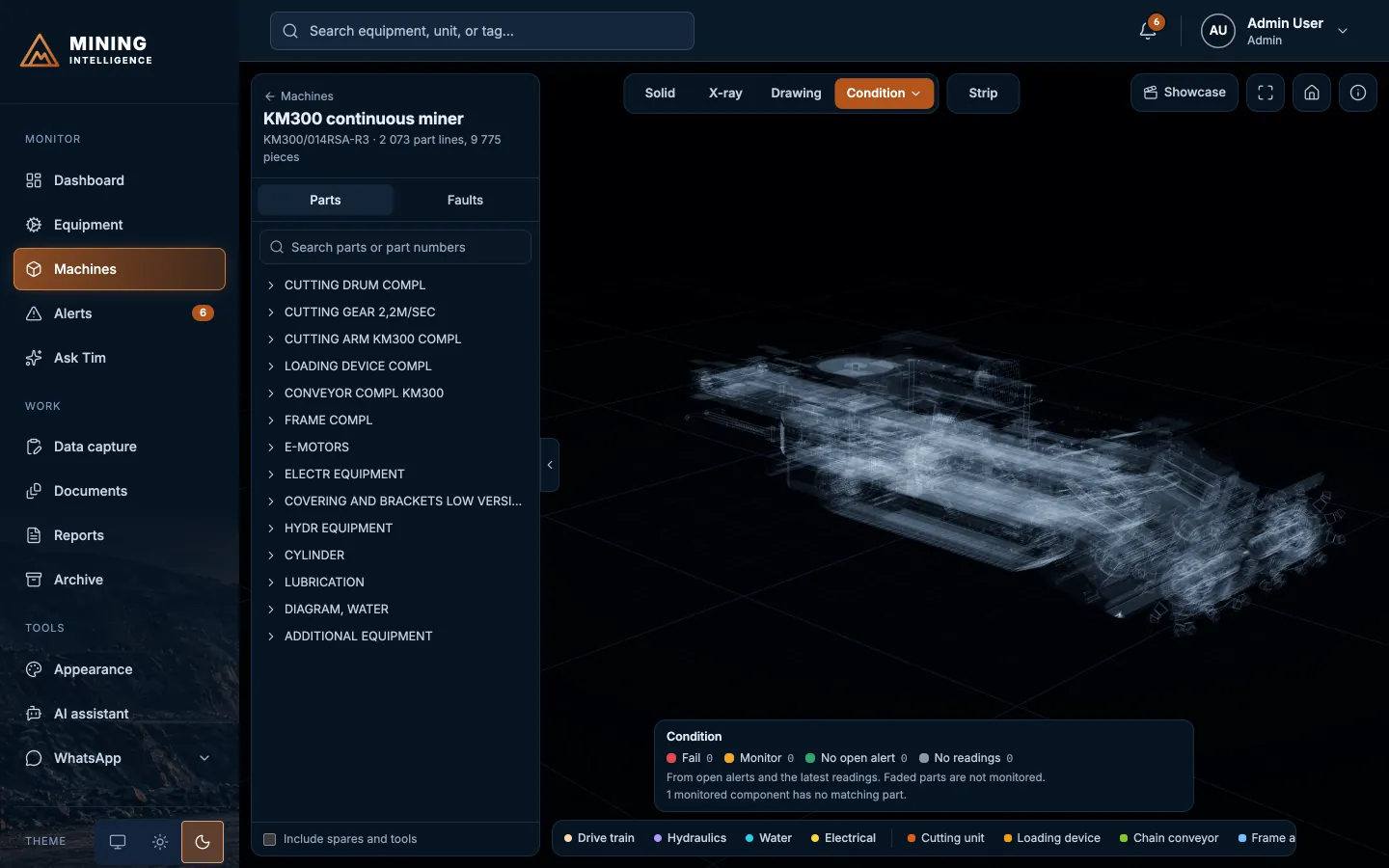
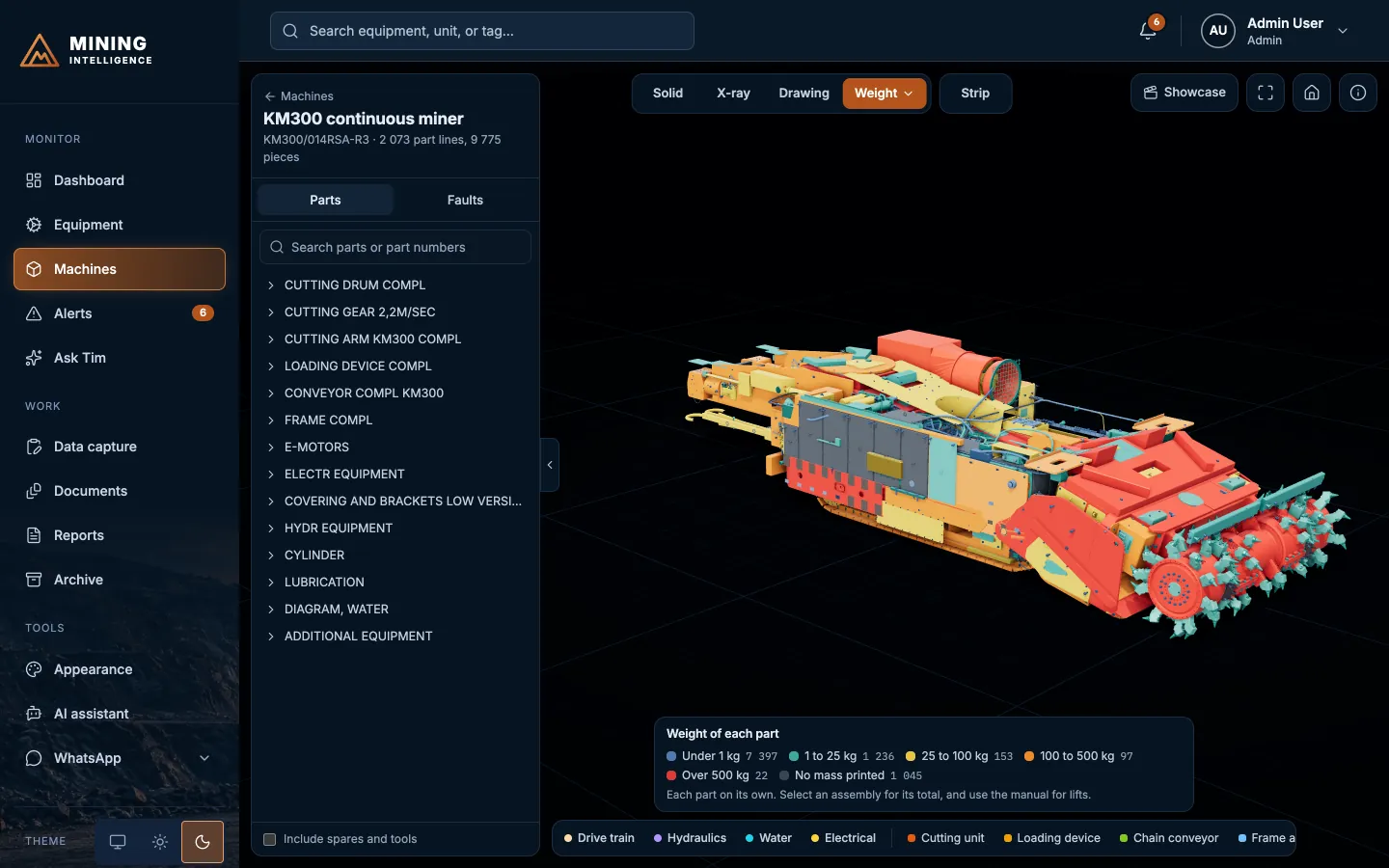
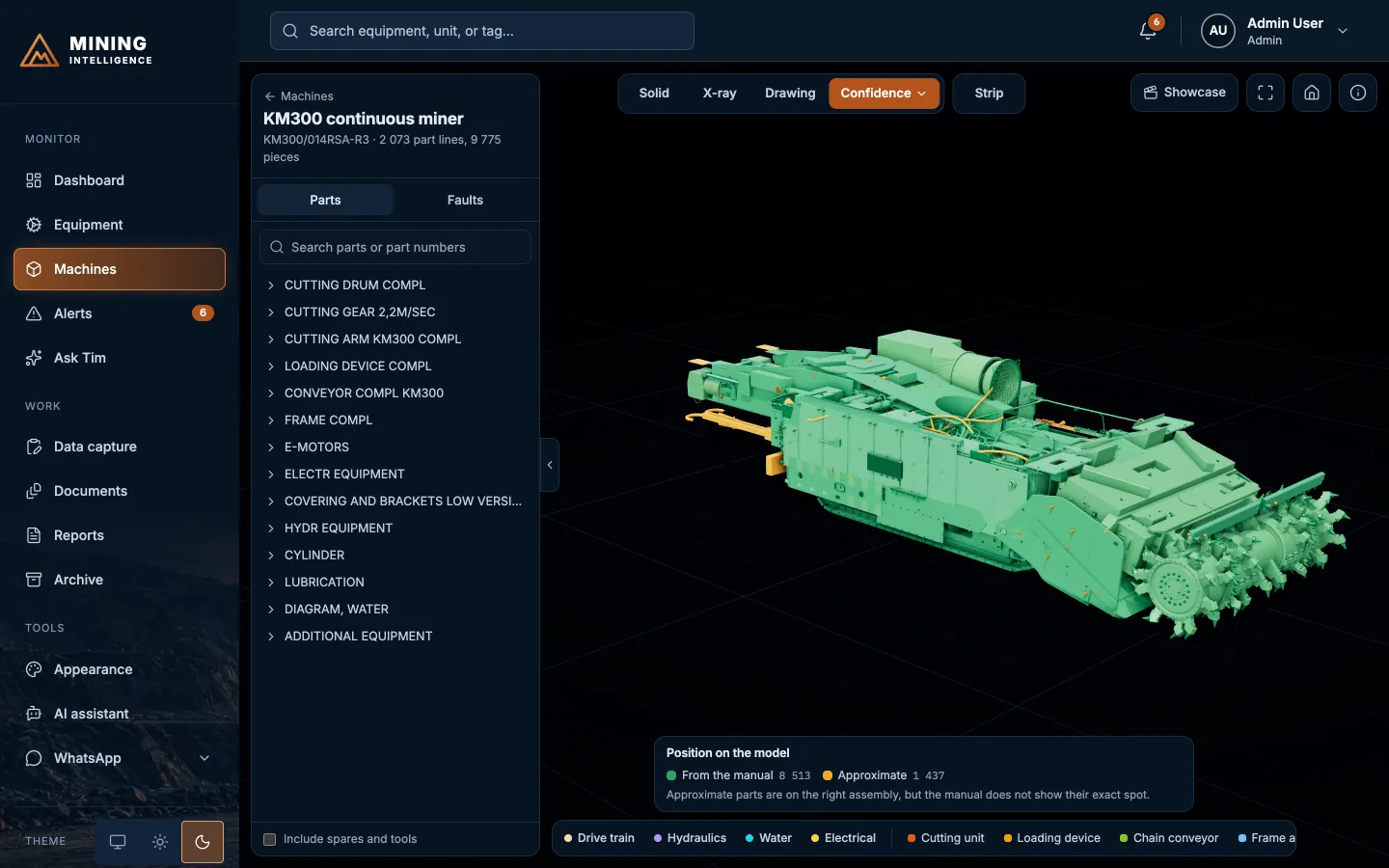
Solid
The machine as built. Every fitted part from the parts manual, coloured by system.
- 2,073part lines
- 9,775individual pieces
- 6ways to look
- 1 clickfrom alert to part
From alarm to spanner
Find it. Isolate it. Strip it. Fix it.
-
01
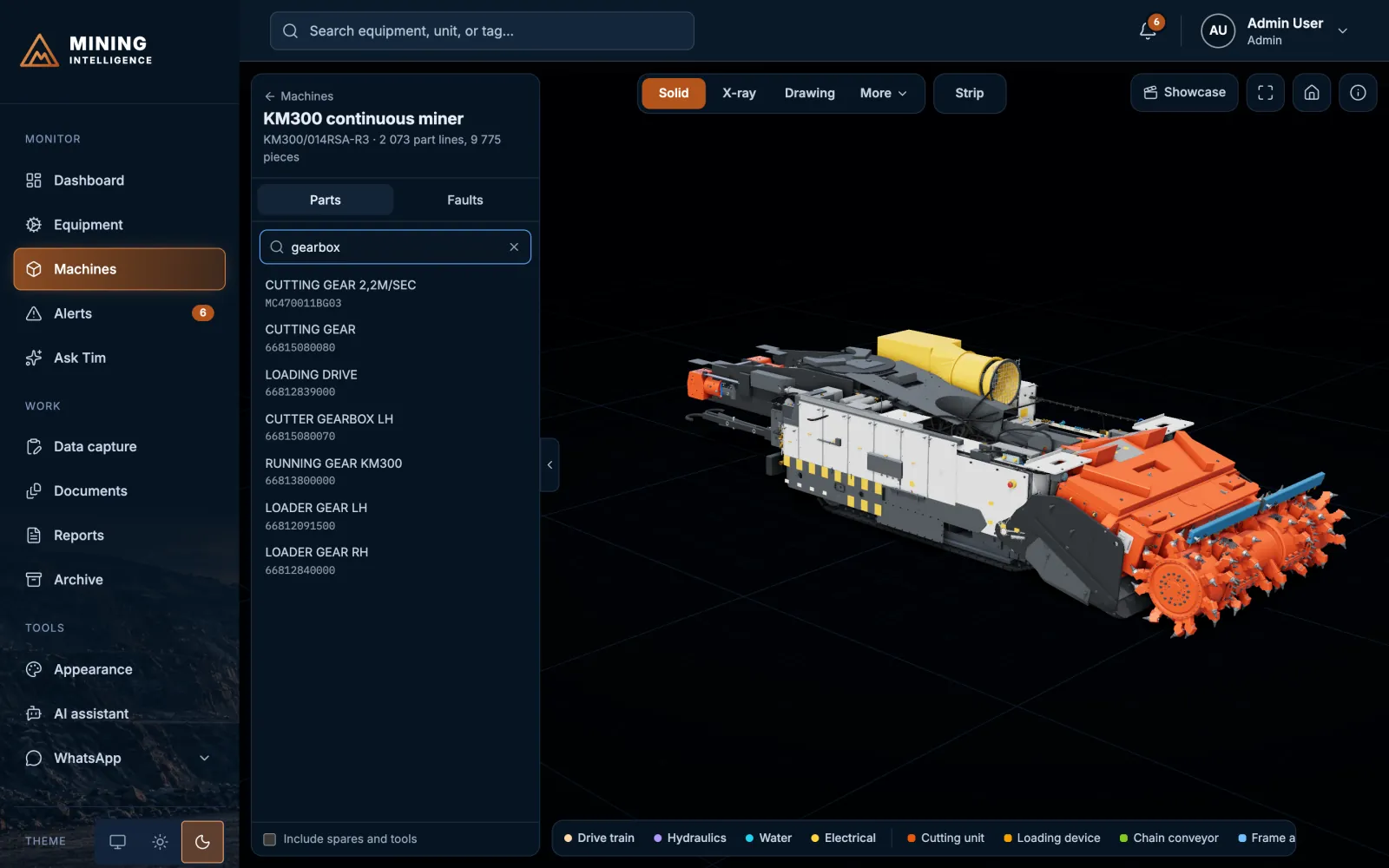
Find any part
Search by name or part number and the model flies straight to it and lights it up.
-
02
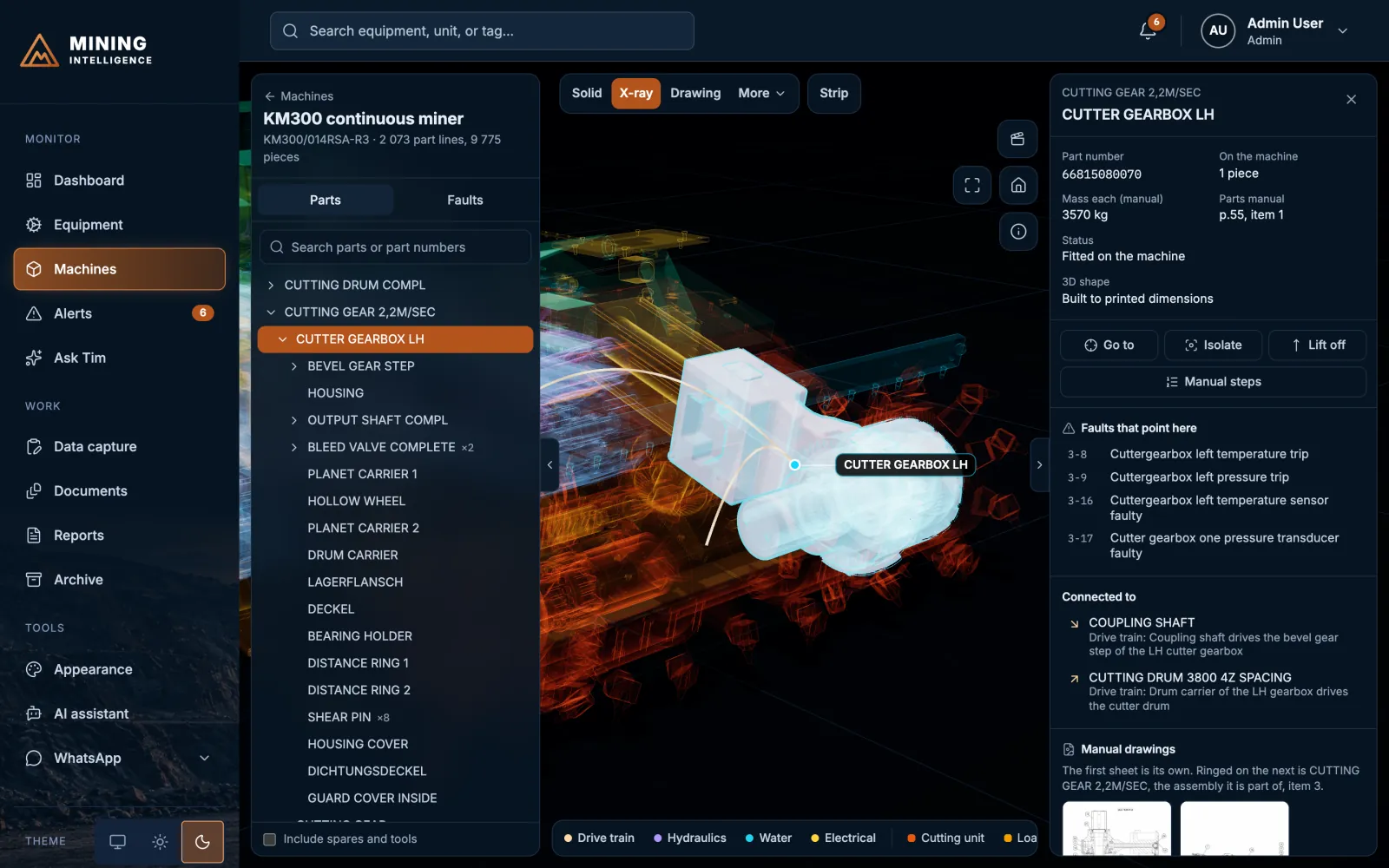
Details on demand
Part number, mass, what it connects to, its manual drawing and the faults that point to it, in one panel.
-
03
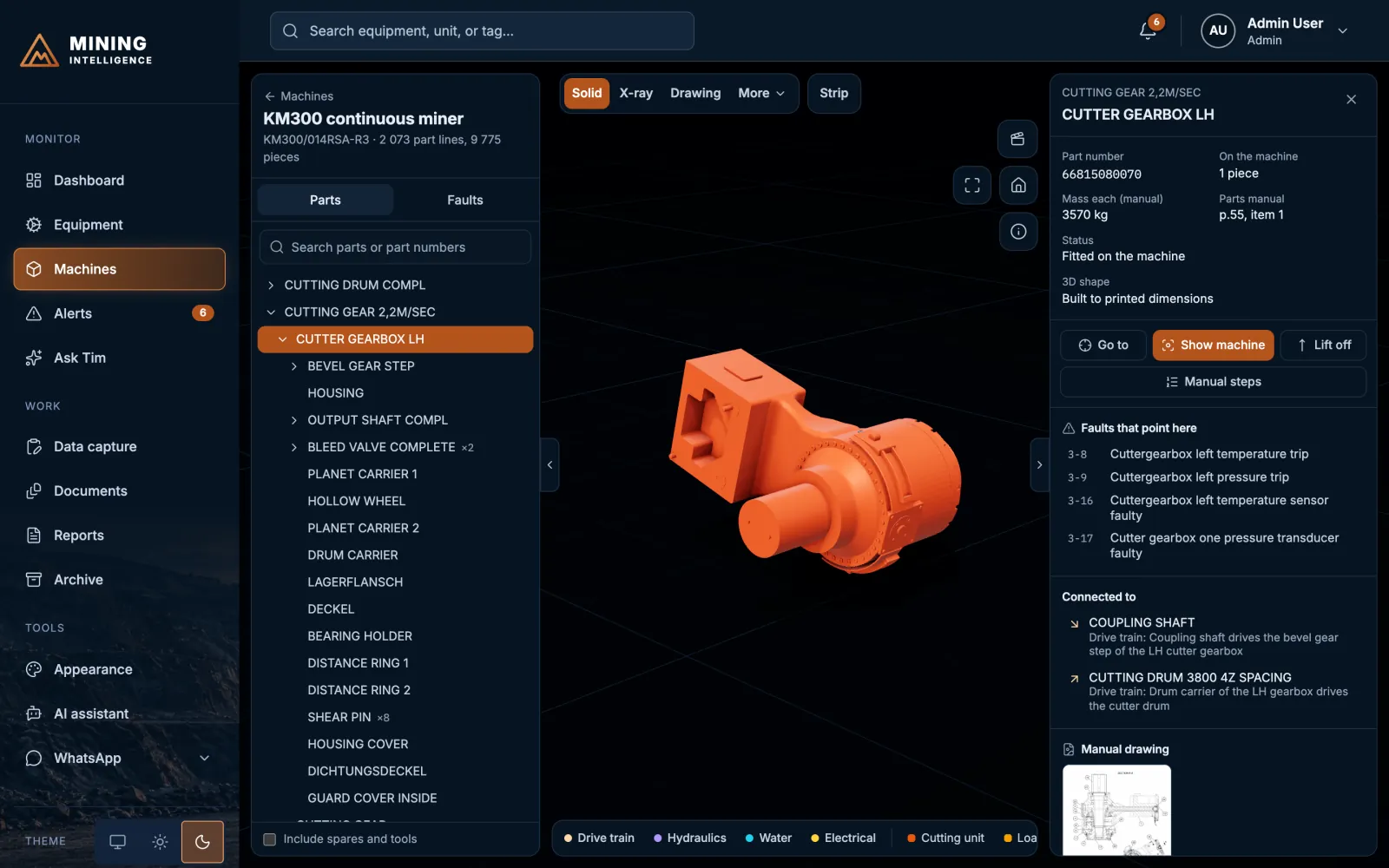
Isolate and lift off
Hide everything else, or lift a part clear of the machine to see how it is fitted.
-
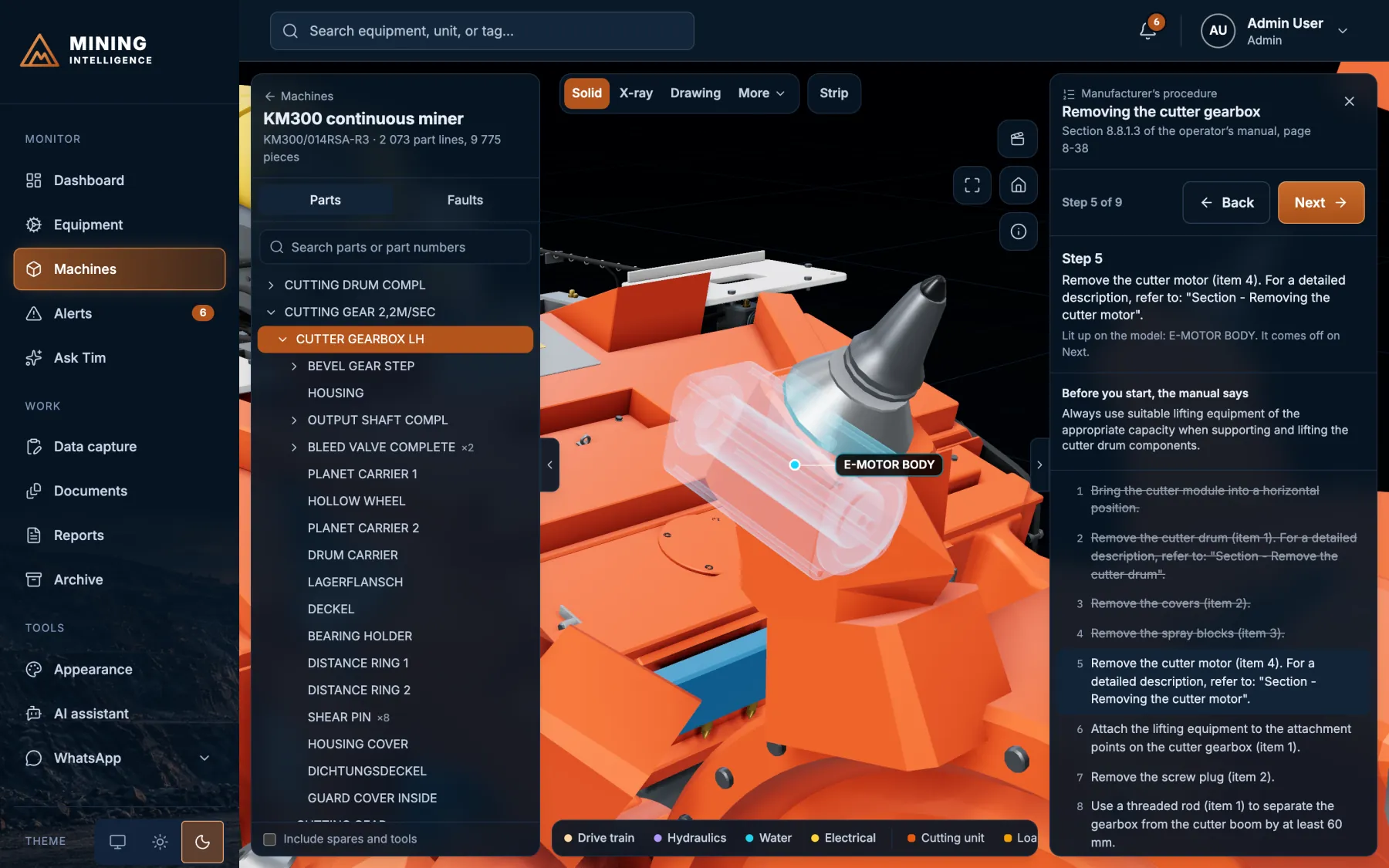
04
Strip it, step by step
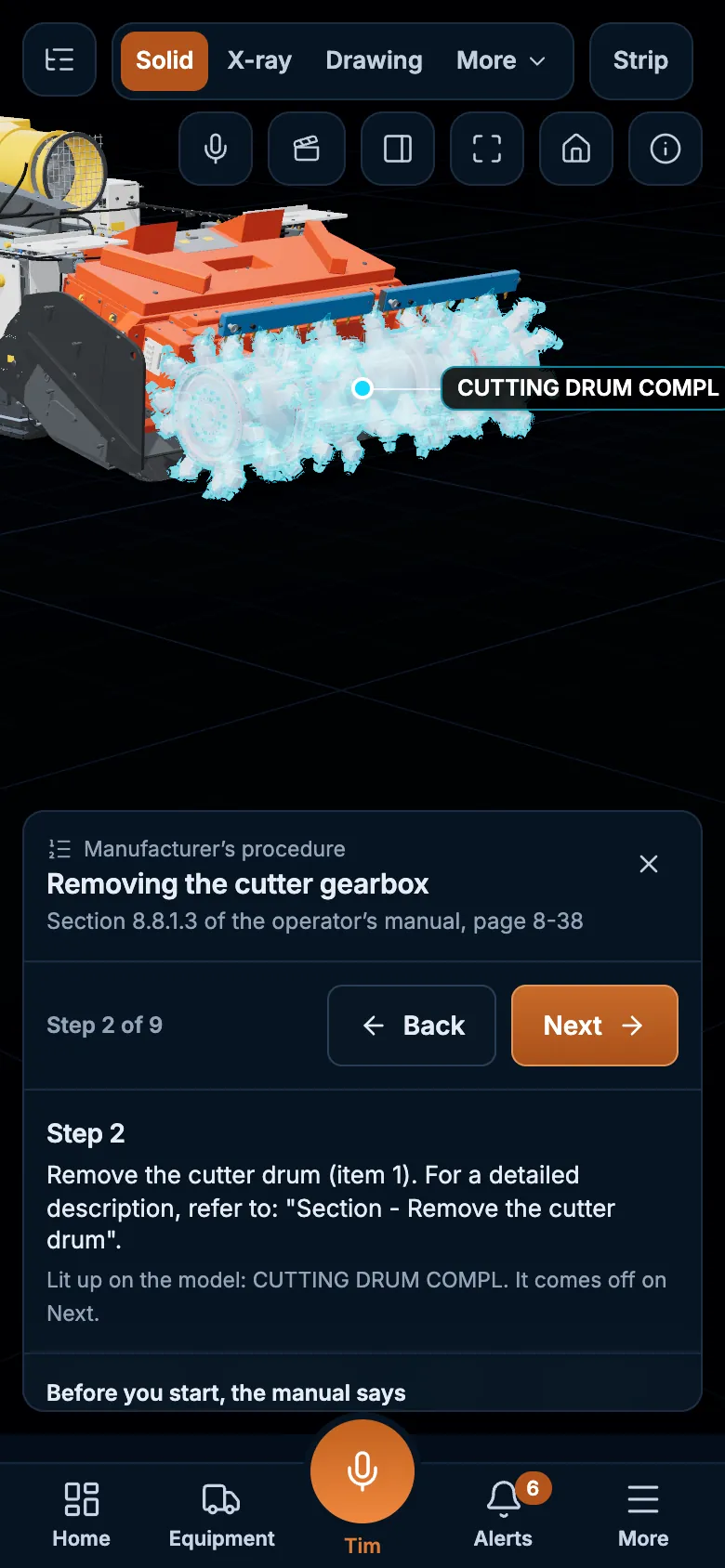
Follow the manufacturer’s numbered procedure on the model. Each step lights up its part and the part comes off on Next, with the manual’s warnings shown first. Where the manual writes no procedure, it says so.
-
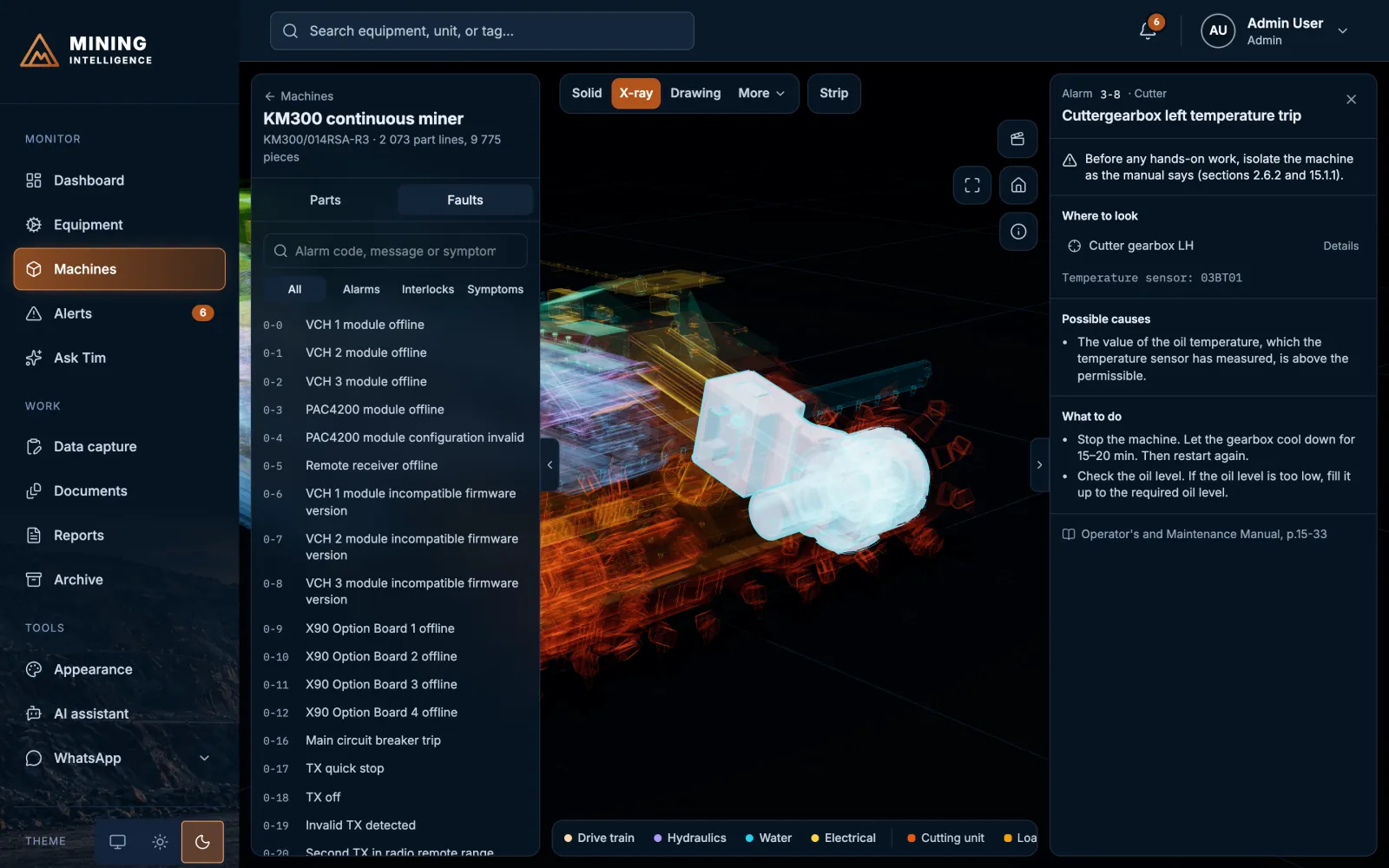
05
A fault guide beside the model
Alarms, interlocks and symptoms from the manual’s fault chapter, searchable. Pick one and the parts that cause it light up.
-
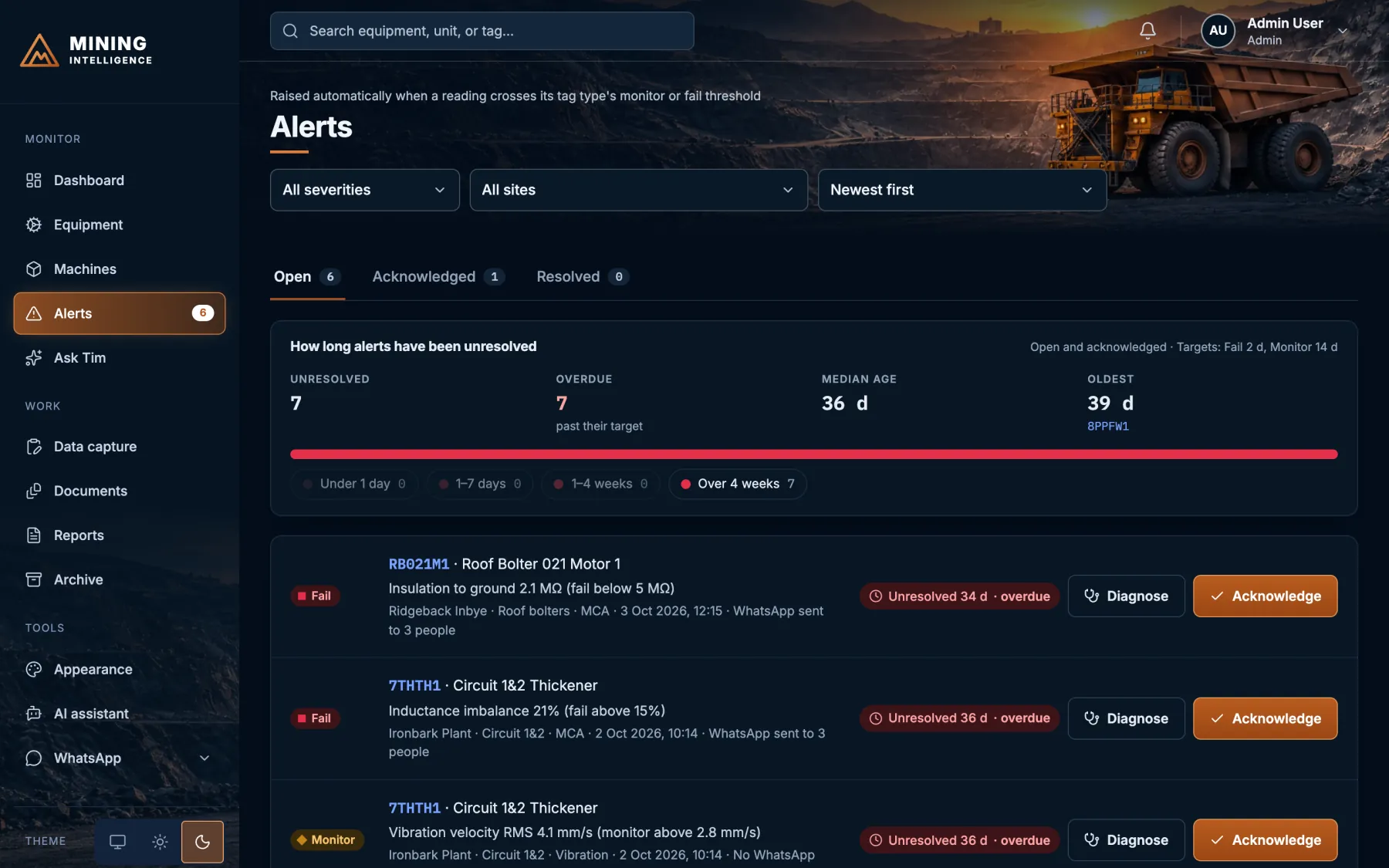
06
From alert to machine
Every alert has a “Show on machine” button: one click from the reading that failed to the part behind it.
Service · 3D scanning
See exactly how much metal is left.
Condition monitoring tells you that something is wearing. A 3D scan measures how much, to a tolerance we agree with you, on mining and engine equipment: liners, buckets, chains, shafts, cylinder bores and more. Watch four jobs.
An illustration with made-up numbers, not a customer measurement. Real jobs are scoped with you: the part, the tolerance and the limits.
Read the four demos as text
Machine chain
A run of five flight sections of the machine’s conveyor chain, taken from its 3D model, is scanned with a laser sweep and laid over the chain as made. Wear shows as colour: the worst is 5.8 mm on a flight tip, against an example limit of 8 mm. Stretch shows as the scan drifting away from the model: the pitch has grown 2.4%, from 362.5 mm to 371.2 mm, so the fifth flight sits 35 mm past where it should, against an example limit of 3%. Both are above 70% of their limits, so the chain is graded Monitor.
Wear plate
A laser scanner records the surface of an 80 mm chute wear plate as a cloud of 3D points. The scan is aligned to the plate as it was made and the distance of every point from that shape is shown as a colour map. The thinnest point is 38 mm, so the worst wear is 42 mm at the centre of the plate. With the example limits of Monitor below 42 mm and Fail below 25 mm, the plate is graded Monitor.
Engine bore
A cylinder bore with a nominal diameter of 130.000 mm is scanned all the way round. The largest diameter is 130.088 mm and the smallest 130.060 mm, so the ovality is 0.028 mm. Against the example limits of +0.150 mm for diameter wear and 0.050 mm for ovality, the bore is within limits and can stay in service. The shape in the picture is exaggerated 740 times so it can be seen.
Wear over time
The same plate is scanned four times, each aligned the same way. The thinnest point goes from 80 mm to 66 mm, 52 mm and 38 mm, a wear rate of about 4.7 mm a month. It crossed the Monitor limit between the third and fourth scan. At that rate, as a straight-line estimate, it reaches the 25 mm Fail limit in about three months.
Mining equipment
Engine and drivetrain
Wear map and sections
A colour map of where metal has gone, with thickness and section cuts at the points that matter.
A graded report
Pass, monitor or fail against the limits for that part, as a PDF with the figures in a spreadsheet.
Scans you keep
The scan data itself, so the next scan can be compared with this one on the same alignment.
Vibration says look. A scan says how much.
Use it with condition monitoring to decide what to repair, what to rebuild and what can stay in service. How precise? That depends on the part, its surface and the scanner. We agree the tolerance you need before we start, and the report says what was achieved.
Ask Tim
Stop hunting through screens. Just ask.
Tim is the assistant built into the platform. Type or talk, and it looks up your data, opens the right page, lights up the part on the 3D model and quotes the manual. Watch three real jobs.
A scripted preview with sample data. In the product, every answer is looked up from your own readings and shows what it was based on.
Read the three demos as text
Alarm to fix
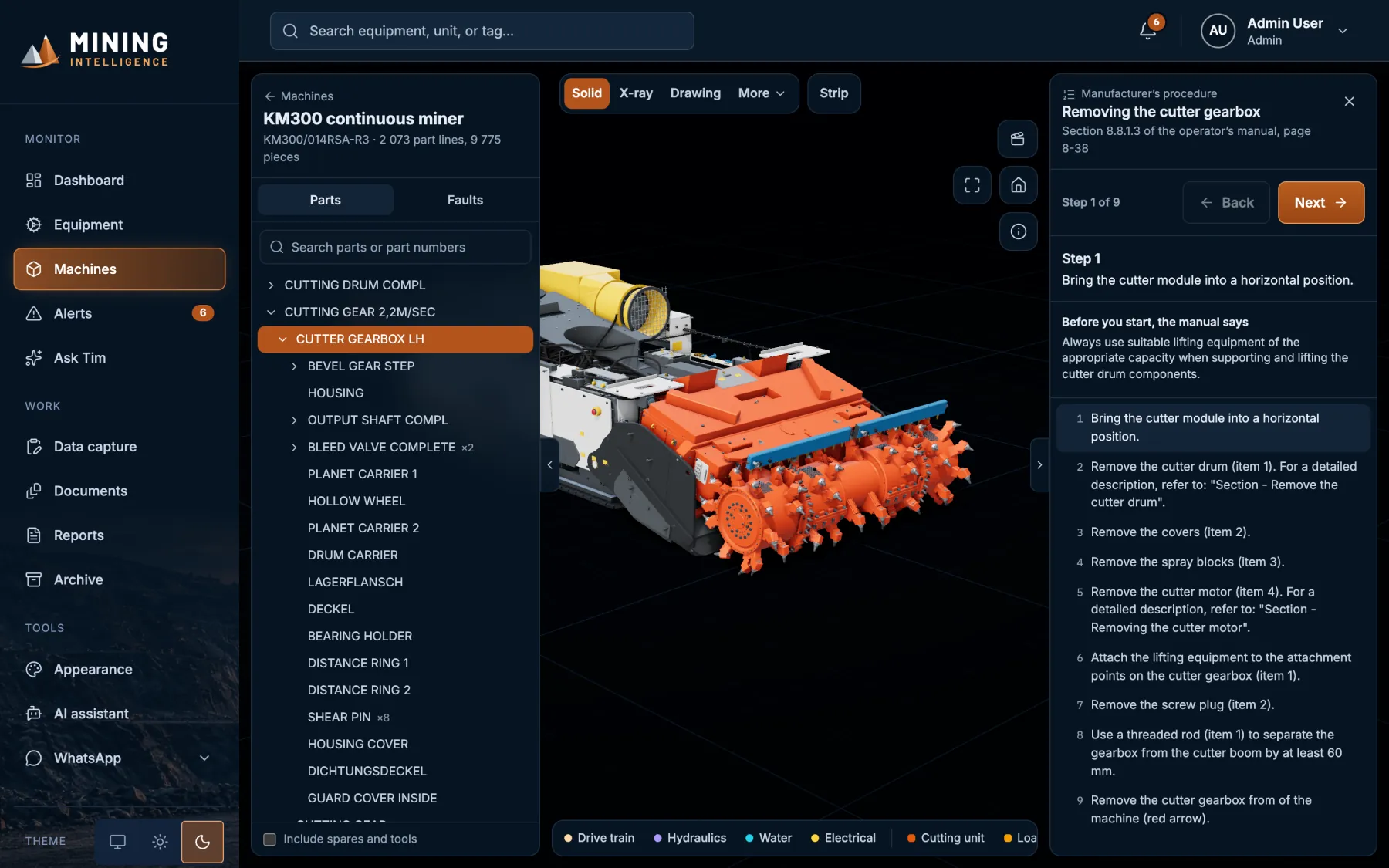
T. Mokoena: Alarm 3-8 on the cutter gearbox. What do I do?
Tim: Here is alarm 3-8 on the model: Cuttergearbox left temperature trip. The oil temperature sensor (03BT01) has measured a value above the permissible. The manual says: stop the machine, let the gearbox cool down for 15 to 20 minutes, then restart; check the oil level and fill it up to the required level if it is too low.
T. Mokoena: Take me through stripping it.
Tim: Starting the manufacturer's procedure, Removing the cutter gearbox, 9 steps. Step 1: bring the cutter module into a horizontal position. Before you start, the manual says to always use suitable lifting equipment of the appropriate capacity.
Plant status
Administrator: What needs attention first today?
Tim: RB021M1 (Roof Bolter 021 Motor 1, Ridgeback Inbye) comes first: insulation to ground is 2.1 MΩ, below the 5 MΩ fail limit, and nobody has acknowledged it yet. Then 7THTH1 (Circuit 1&2 Thickener, Ironbark Plant): inductance imbalance 21%, over the 15% fail limit, also unacknowledged. A third Fail, CM014G, has been acknowledged. Key figures show 3 in Fail, 3 on Monitor and 80% equipment health, a bar shows the fleet split of 24 pass, 3 monitor, 3 fail and 7 not scanned, and a “Based on” list names the pages the answer used.
Administrator: Show me the open Fail alerts.
Tim: Here are the open Fail alerts, and the alerts page opens.
Hands-free voice
Tim (spoken): Hi T. Mokoena, Tim here. Before we start: 2 machines are in Fail and not acknowledged yet, including 7THTH1 and RB021M1. 3 more machines are on Monitor and not acknowledged yet, including 8PPFW1 and 7CV0B1. What would you like to know?
T. Mokoena (spoken): Show me the left cutter gearbox.
Tim (spoken): Here it is on the model: cutter gearbox LH. Part number 66815080070, one fitted, 3,570 kilograms each according to the manual. Want me to take it apart step by step?
Ask instead of hunting
Find a part by name or number, open an alarm with its parts lit, or jump to a filtered alerts page, in one sentence.
Straight from the manual
Alarm causes and fixes, strip procedures and part masses are quoted as the manual prints them, never guessed.
Facts, with sources
Every figure comes from your readings, with a “Based on” list and dates so anyone can check it.
Speaks and listens
A hands-free voice chat that opens with what needs attention, reads answers aloud and lets you interrupt.
The right answer for the reader
Administrators get risk and workload, technicians get values and likely failure modes, client viewers get plain language and only their sites.
Safe by design
Read-only: Tim cannot change a reading and never controls a machine. Administrators set limits and see usage. Optional, switched on per client.
The alert finds you. You answer from your pocket.
Fails reach the right people on the app they already open all day, and a tap or a short message is enough to act on them.
Fails reach people at once
A Fail is pushed to opted-in people the moment it is raised, ahead of quiet hours. Monitor alerts go in the daily digest.
Acknowledge with one tap
Administrators and technicians acknowledge from the chat, logged just like in the app.
Escalates when nobody answers
A Fail left unacknowledged is escalated to administrators after a time you set.
Ask the plant by message
“summary”, “alerts”, “status RB021M1” or “any fails at ridgeback today?” Plain language works.
Reports arrive as PDFs
Send “report” and a scan code and the scan report lands in the chat.
Under your control
Read-only, scoped to each person’s sites, opt in and out with START and STOP. Every message is logged and its delivery tracked.
Optional and set up with you: numbers, scope and running costs are agreed per client. It uses WhatsApp Business through Meta’s Cloud API.
A scripted preview with sample data and the real message wording.
Read the three demos as text
Alert and tap
Message: FAIL · RB021M1, Roof Bolter 021 Motor 1, Ridgeback Inbye · Roof bolters. Insulation to ground 2.1 MΩ (fail below 5 MΩ). Scan SC-0249 · T. Mokoena. Buttons: Acknowledge, View readings.
Reply to Acknowledge: Acknowledged: RB021M1 Insulation to ground 2.1 MΩ (fail below 5 MΩ). The View readings button replies with the machine’s latest readings.
Ask by message
Sending “summary” returns the 37 assets split into 3 Fail, 3 Monitor, 24 Pass and 7 not scanned, the open alerts (3 Fail, 4 Monitor) and how many are not acknowledged yet. “any fails at ridgeback today?” lists the 2 open fails at that site. “report SC-0249” returns the scan report as a PDF.
If nobody answers
A daily digest says how many Fail and Monitor alerts are open and names the worst. A Fail nobody acknowledges is escalated to administrators with an ESCALATION message after a time you set. Sending STOP unsubscribes, and START opts back in.
On the phone
An app for the person with the spanner.
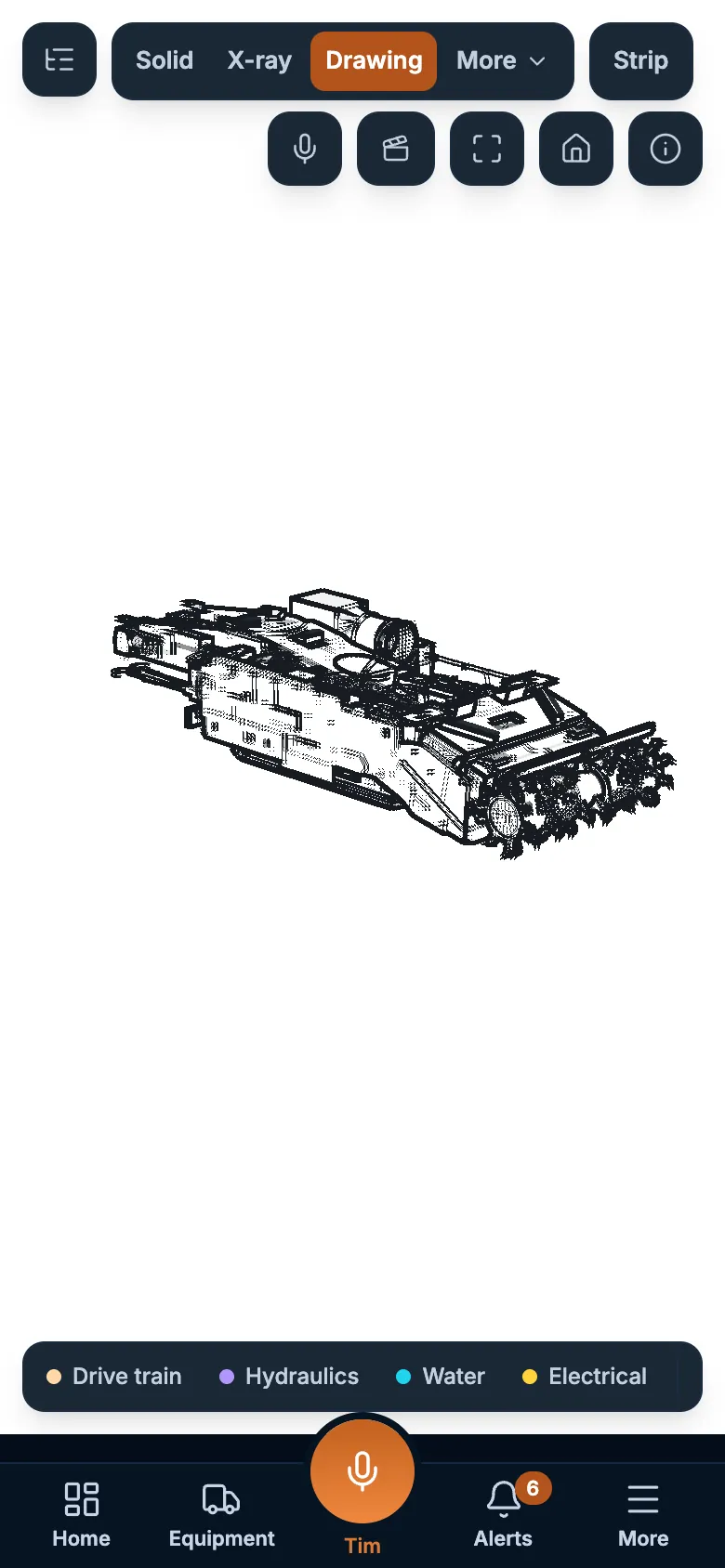
On a phone the platform becomes an app, not a squeezed website. Open a strip procedure at the machine, check an alert on the way to site, ask Tim hands-free.
- Five layouts: Tab Bar, Shift Brief, Ask Tim, Plant Grid and Field Tiles
- Installs to the home screen, nothing to download from a store
- Strip steps, drawings and the 3D model in your hand
How it works
From reading to report in four steps.
-
Capture
Enter readings, import a CSV or Excel file, or upload a supported PDF report.
-
Grade
Each reading is graded pass, monitor or fail against the limits for its equipment type.
-
Alert
The right people hear in the app, by email and on WhatsApp, and the alert is tracked until it is closed.
-
Diagnose and report
Open the part on the 3D model, work the fault guide, then send a client-ready PDF report.

Built for the mine, and for your data
Your readings stay yours.
Everyone signs in with their own account, and what they see depends on their role.
Role-based access
Admin, Technician and Client viewer. A client sees only the sites they are given.
Audit trail
User and system actions are logged, so you can see who did what and when.
Encrypted
All traffic uses HTTPS, and database backups are encrypted.
Privacy by design
Privacy controls aligned with POPIA. WhatsApp alerts and Tim are optional, switched on only with your agreement.
Questions
What people ask before a demo.
Do we need to fit new sensors?
No. Mining Intelligence works with the readings you already take. Enter them in the app, import a CSV or Excel file, or upload a supported PDF report, and each reading is graded against the limits for its equipment type.
Which kinds of condition data does it handle?
Motor circuit analysis, vibration, oil and thermal readings, in one place. Every reading is graded pass, monitor or fail, so the health of a whole plant can be read at a glance.
How do alerts reach the right people?
When a reading crosses a limit an alert is raised in the app and sent by email, and on WhatsApp if you switch it on. Each alert is tracked until it is closed.
What is the 3D machine model?
A 3D model of the machine rebuilt from its own manuals, with every fitted part selectable. Alerts and fault codes open the part on the model, with its drawing and the strip steps beside it. Each machine type is built from its own manuals, so ask us about your fleet.
Who can see our data?
Everyone signs in with their own account and sees what their role allows: Admin, Technician or Client viewer. A client sees only the sites they are given. User and system actions are logged, all traffic uses HTTPS and database backups are encrypted.
Do we have to use the AI assistant or WhatsApp?
No. Tim, the AI assistant, and WhatsApp alerts are optional, and are switched on only with your agreement.
Does it work on a phone?
Yes. On a phone the platform becomes an app that installs to the home screen, with nothing to download from a store: alerts, strip steps, drawings and the 3D model in your hand.
Do you also measure wear?
Yes, as a separate service. 3D scanning measures how much metal is left on liners, chains, buckets, shafts, cylinder bores and more, to a tolerance agreed with you.
How do we get started?
Tell us what you monitor and we will arrange a demonstration on sample data.
Ready to see your machines this way?
Tell us what you monitor and we will arrange a demonstration on sample data.